
The right document. The right version. Every time.
Eliminate version confusion, streamline approvals, and ensure everyone works from the latest controlled document. Q-Hub replaces shared drives and email chains with a proper document management system.
Trusted by document-heavy industries worldwide






From draft to controlled document in four steps
Create or Upload
Draft documents in Q-Hub or upload existing files. Set metadata, assign ownership, and choose the approval workflow.
Review & Approve
Documents route through your defined approval workflow. Approvers receive notifications and can review, comment, and approve from any device.
Publish & Distribute
Approved documents are published to relevant teams. Q-Hub tracks acknowledgement and sends reminders to anyone who has not read the latest version.
Review & Renew
Documents flag for review before expiry dates. Owners update, re-approve, and republish. The cycle maintains currency automatically.
No more "Final_v3_ACTUAL_FINAL.docx"
Q-Hub maintains a single source of truth for every document. When someone edits a document, the previous version is automatically archived. Staff always access the latest approved version, and auditors can trace the complete revision history.
- Automatic version numbering on every change
- Side-by-side version comparison
- Rollback to any previous version with one click
- Full audit trail of who changed what and when
Trusted by compliance teams worldwide
“Qhub provides a visible, intuitive way to manage data and workflows, revolutionising our approach to operations”

Fowlers of Bristol (Engineers) Ltd
Operations director
“Qhub helps us to... proactively use our QMS... and increase efficiency”

Anglia Cathodic Protection Services
Business manager
“Really made a difference with providing compliance during audits – both regulatory, customer, and internal.”

Auxitrol Weston
Quality manager
“QHub has supported us in achieving a higher compliance rate.”

BMC Analysis
Technical Manager/ Quality Manage
“We can't believe how fast we were able to get it up and running.”

Cawood Group
“Managing NCRs are now so much easier”

Enviromesh
Quality manager
“Where was this 2 years ago... we're blown away”

Jaltek
Compliance manager for Jaltek
“Qhub has improved our safety management system no end, making it very efficient”

Rocal Endurance Doors
Compliance manager
“We use it for as much as possible.”

Scottish Leather Group
Compliance manager
Used across regulated industries
How Q-Hub compares to other QHSE software
Feature-by-feature comparison with leading quality, safety, and compliance platforms.
| Feature | EcoOnline | SafetyCulture | Qualio | Intelex | Ideagen | Q-Hub |
|---|---|---|---|---|---|---|
| Integrated QHSE platform | Limited | ✗ | ✗ | Limited | Limited | ✓ |
| Document control with e-signatures | ✗ | ✗ | ✓ | Limited | ✓ | ✓ |
| Audit & inspection management | Limited | ✓ | Limited | ✓ | ✓ | ✓ |
| CAPA & NCR workflows | Limited | ✗ | ✓ | ✓ | ✓ | ✓ |
| Incident reporting | ✓ | ✓ | ✗ | ✓ | Limited | ✓ |
| Risk assessment builder | ✓ | Limited | ✗ | ✓ | Limited | ✓ |
| Training & competence tracking | Limited | ✗ | ✗ | Limited | ✗ | ✓ |
| Custom form builder | Limited | ✓ | Limited | ✓ | ✓ | ✓ |
| Supplier management | ✗ | ✗ | Limited | Limited | Limited | ✓ |
| Mobile offline inspections | ✓ | ✓ | ✗ | Limited | Limited | ✓ |
| Management review module | ✗ | ✗ | ✗ | Limited | Limited | ✓ |
| ROI calculator | ✗ | ✗ | ✗ | ✗ | ✗ | ✓ |
| UK data hosting | Limited | ✗ | ✗ | ✗ | Limited | ✓ |
| UK-based support team | Limited | ✗ | ✗ | ✗ | ✓ | ✓ |
| Transparent pricing (no hidden fees) | ✗ | ✗ | ✗ | ✗ | ✗ | ✓ |
| Free 30-day trial | ✗ | ✓ | ✓ | ✗ | ✗ | ✓ |
| Live in under 4 weeks | ✗ | ✗ | ✗ | ✗ | ✗ | ✓ |
Competitor pricing as published by each vendor. Figures marked ≈ are converted from the currency they were published in at today’s rate, for comparison only.
Your data is safe with us
Each certification and commitment, with the detail behind it.
Connects with the tools you already use
Q-Hub connects to your existing tools via REST API, webhooks and SSO, with bespoke connectors on request. More integrations coming soon.
Document control questions
Yes. Q-Hub supports bulk document import and our implementation team will help you plan your migration. Most customers have their full document library migrated within the first two weeks of implementation.
It does. Q-Hub satisfies all ISO 9001 clause 7.5 requirements for documented information, including version control, approval workflows, controlled distribution, and retention policies. Many of our customers cite document control as the primary reason they passed their ISO certification audits.
Q-Hub is a cloud-based system, so an internet connection is needed for full functionality. However, users can download controlled copies for offline reference. These are watermarked as "uncontrolled" to prevent confusion with the live version.
When you create or approve a document, you set a review date. Q-Hub sends automated reminders to the document owner 30, 14, and 7 days before the review date. Expired documents are flagged in the dashboard and can be restricted from distribution until reviewed.
Book a personalised demo
See how Q-Hub fits your team. Our specialists will walk you through the platform, answer your questions, and show you exactly how it works for your industry.
View PricingNo credit card required · 30-day free trial · Live in 4 weeks
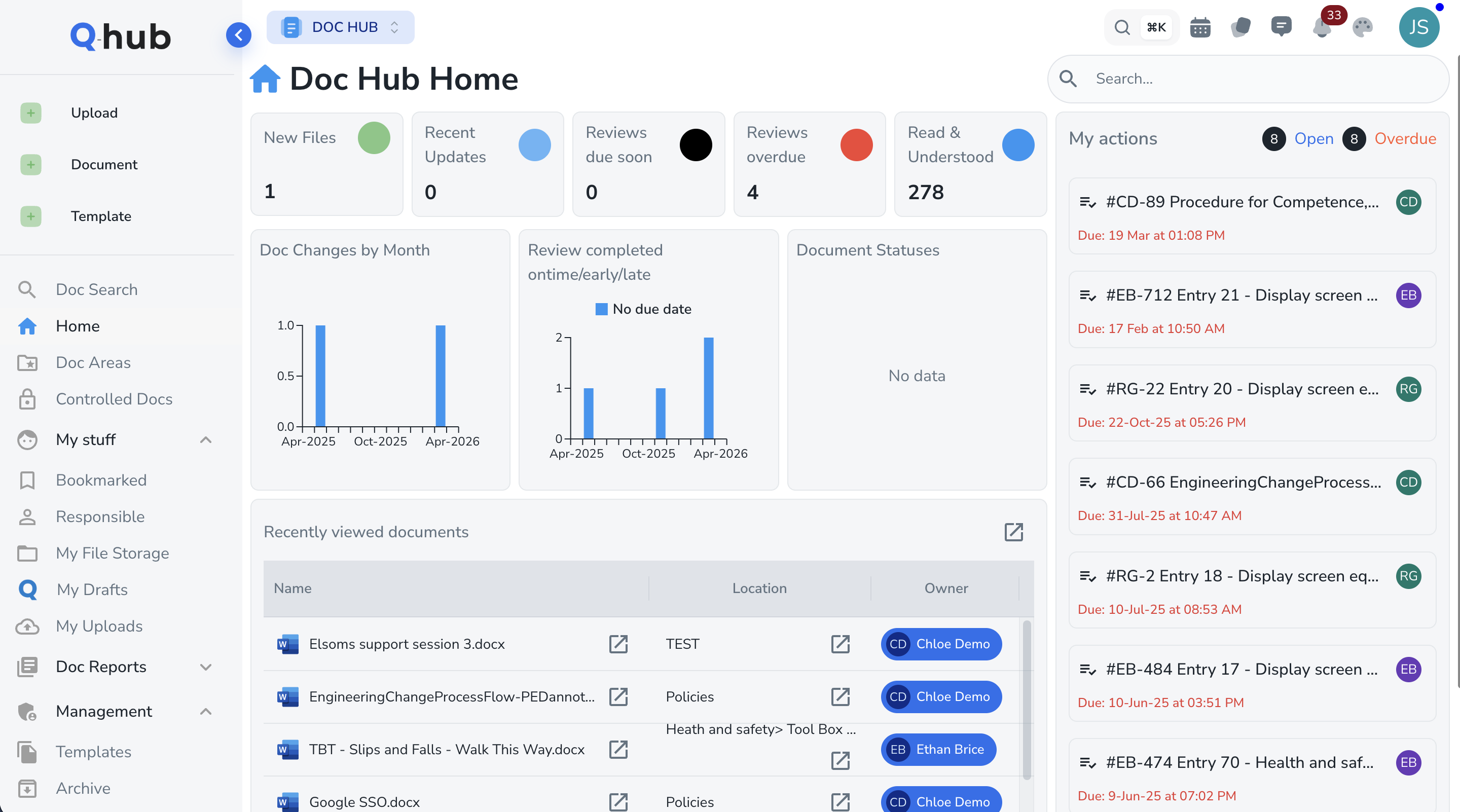
Document control that people actually use
Automatic Version Control
Every edit creates a new version with full change history. Previous versions are archived but always accessible for reference or audit purposes.
Configurable Approval Workflows
Route documents through single or multi-stage approval workflows. Approvers receive notifications and can approve, reject, or request changes with comments.
Controlled Distribution
Publish documents to specific teams, departments, or roles. Q-Hub tracks who has read each document and sends reminders to those who have not.
Expiry & Review Tracking
Set review dates for every document. Q-Hub notifies document owners before review dates and flags expired documents automatically.
Full-Text Search
Find any document by title, content, or metadata in seconds. No more digging through folder hierarchies or asking colleagues where something is saved.
Access Control
Control who can view, edit, and approve each document. Role-based permissions ensure sensitive documents stay restricted to authorised personnel.
Approvals that happen in hours, not weeks
Configure approval workflows that match your business processes. Whether you need a single sign-off or a multi-stage review by technical, quality, and management teams, Q-Hub routes documents to the right approvers and tracks progress.
- Sequential or parallel approval stages
- Approve, reject, or request changes with inline comments
- Automatic escalation for overdue approvals
- Digital signatures with timestamp and user ID