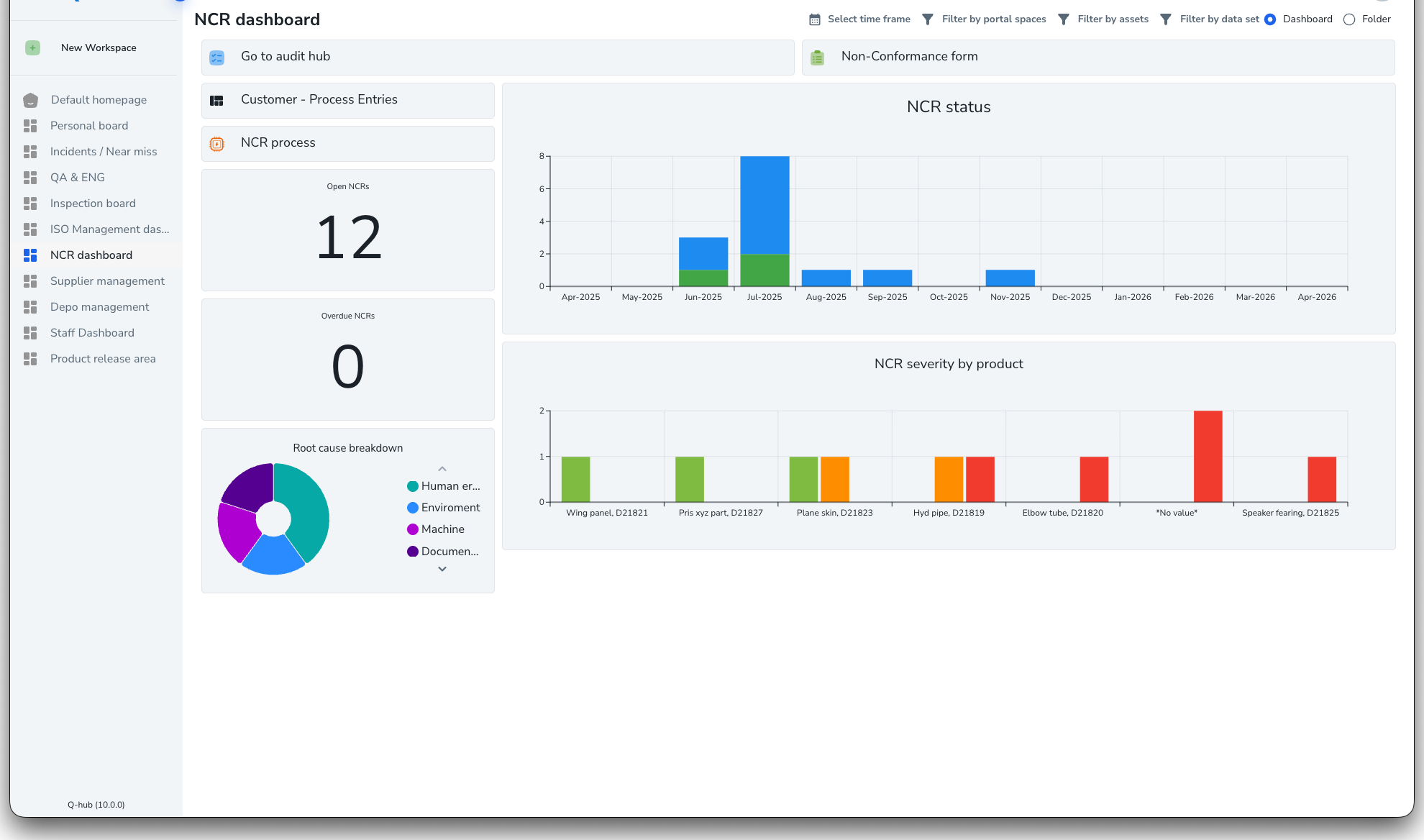
Audits that drive improvement, not just compliance.
Plan audit schedules, build custom checklists, capture findings on-site, and track corrective actions to closure. Q-Hub turns auditing from a box-ticking exercise into a genuine improvement machine.
Trusted by quality and compliance teams worldwide







Four phases, fully tracked
Plan
Define scope, assign auditors, and set the schedule. Q-Hub sends automated notifications to all participants.
Execute
Auditors work through checklists on-site, capturing evidence and scoring criteria in real time.
Report
Generate audit reports automatically from captured data. Include findings, scores, photos, and recommendations.
Improve
Non-conformances trigger CAPA workflows. Track corrective actions to closure and verify effectiveness.
Annual audit programmes, planned in minutes
Build your full-year audit schedule against ISO clauses, processes, or departments. Q-Hub calculates resource requirements, avoids scheduling conflicts, and sends automated invitations to audit teams.
- Drag-and-drop audit calendar
- Assign lead and supporting auditors per audit
- Link audits to specific ISO clauses or processes
- Track audit completion rates against the annual plan
Trusted by compliance teams worldwide
“Qhub provides a visible, intuitive way to manage data and workflows, revolutionising our approach to operations”

Fowlers of Bristol (Engineers) Ltd
Operations director
“Qhub helps us to... proactively use our QMS... and increase efficiency”

Anglia Cathodic Protection Services
Business manager
“Really made a difference with providing compliance during audits – both regulatory, customer, and internal.”

Auxitrol Weston
Quality manager
“QHub has supported us in achieving a higher compliance rate.”
BMC Analysis
Technical Manager/ Quality Manage
“We can't believe how fast we were able to get it up and running.”

Cawood Group
“Managing NCRs are now so much easier”

Enviromesh
Quality manager
“Where was this 2 years ago... we're blown away”

Jaltek
Compliance manager for Jaltek
“Qhub has improved our safety management system no end, making it very efficient”

Rocal Endurance Doors
Compliance manager
“We use it for as much as possible.”

Scottish Leather Group
Compliance manager
Used across regulated industries
How Q-Hub compares to other QHSE software
Feature-by-feature comparison with leading quality, safety, and compliance platforms.
| Feature | EcoOnline | SafetyCulture | Qualio | Intelex | Ideagen | Q-Hub |
|---|---|---|---|---|---|---|
| Integrated QHSE platform | Limited | ✗ | ✗ | Limited | Limited | ✓ |
| Document control with e-signatures | ✗ | ✗ | ✓ | Limited | ✓ | ✓ |
| Audit & inspection management | Limited | ✓ | Limited | ✓ | ✓ | ✓ |
| CAPA & NCR workflows | Limited | ✗ | ✓ | ✓ | ✓ | ✓ |
| Incident reporting | ✓ | ✓ | ✗ | ✓ | Limited | ✓ |
| Risk assessment builder | ✓ | Limited | ✗ | ✓ | Limited | ✓ |
| Training & competence tracking | Limited | ✗ | ✗ | Limited | ✗ | ✓ |
| Custom form builder | Limited | ✓ | Limited | ✓ | ✓ | ✓ |
| Supplier management | ✗ | ✗ | Limited | Limited | Limited | ✓ |
| Mobile offline inspections | ✓ | ✓ | ✗ | Limited | Limited | ✓ |
| Management review module | ✗ | ✗ | ✗ | Limited | Limited | ✓ |
| ROI calculator | ✗ | ✗ | ✗ | ✗ | ✗ | ✓ |
| UK data hosting | Limited | ✗ | ✗ | ✗ | Limited | ✓ |
| UK-based support team | Limited | ✗ | ✗ | ✗ | ✓ | ✓ |
| Transparent pricing (no hidden fees) | ✗ | ✗ | ✗ | ✗ | ✗ | ✓ |
| Free 30-day trial | ✗ | ✓ | ✓ | ✗ | ✗ | ✓ |
| Live in under 4 weeks | ✗ | ✗ | ✗ | ✗ | ✗ | ✓ |
Competitor pricing as published by each vendor. Figures marked ≈ are converted from the currency they were published in at today’s rate, for comparison only.
Your data is safe with us
Each certification and commitment, with the detail behind it.
Connects with the tools you already use
Q-Hub connects to your existing tools via REST API, webhooks and SSO, with bespoke connectors on request. More integrations coming soon.
Audit management questions
Yes. You can build checklists from scratch or start from our ISO 9001, ISO 14001, and ISO 45001 templates. Each question supports scoring, evidence requirements, and guidance notes for auditors.
It does. You can create supplier-specific audit templates and track supplier performance over time. Audit findings and CAPAs are linked to the supplier record for easy reference during supplier reviews.
When an auditor raises a finding, Q-Hub creates a corrective action with assigned ownership and a deadline. The responsible person documents root cause analysis, implements corrective actions, and submits evidence. A verifier then confirms effectiveness before the CAPA is closed.
Yes. Q-Hub provides trend dashboards showing finding frequency by category, department, and audit cycle. This helps you identify systemic issues and measure whether corrective actions are driving genuine improvement.
Book a personalised demo
See how Q-Hub fits your team. Our specialists will walk you through the platform, answer your questions, and show you exactly how it works for your industry.
View PricingNo credit card required · 30-day free trial · Live in 4 weeks
Audit management that actually works
Audit Scheduling
Build annual audit programmes with recurring schedules. Assign lead auditors, set scope, and auto-notify participants ahead of time.
Configurable Checklists
Create checklists for ISO 9001, ISO 14001, ISO 45001, or build your own. Include evidence requirements, scoring criteria, and clause references.
On-Site Data Capture
Auditors capture findings, attach photos, and score criteria directly from a tablet or phone. No more paper forms transcribed days later.
Automated CAPA Tracking
Non-conformances raised during audits flow straight into CAPA workflows. Track root cause analysis, corrective actions, and verification to closure.
Trend Analysis
Spot recurring findings across audits, departments, and time periods. Identify systemic issues before they become major non-conformances.
One-Click Audit Reports
Generate professional audit reports with findings, evidence, scores, and CAPA status. Ready to share with management or certification bodies.
From finding to fix, tracked end to end
Every audit finding becomes a trackable action with ownership, deadlines, and evidence requirements. Q-Hub ensures nothing falls through the cracks between identifying an issue and verifying it has been resolved.
- Categorise findings as major, minor, or observation
- Automated escalation for overdue corrective actions
- Structured root cause analysis templates
- Verification sign-off with evidence attachment