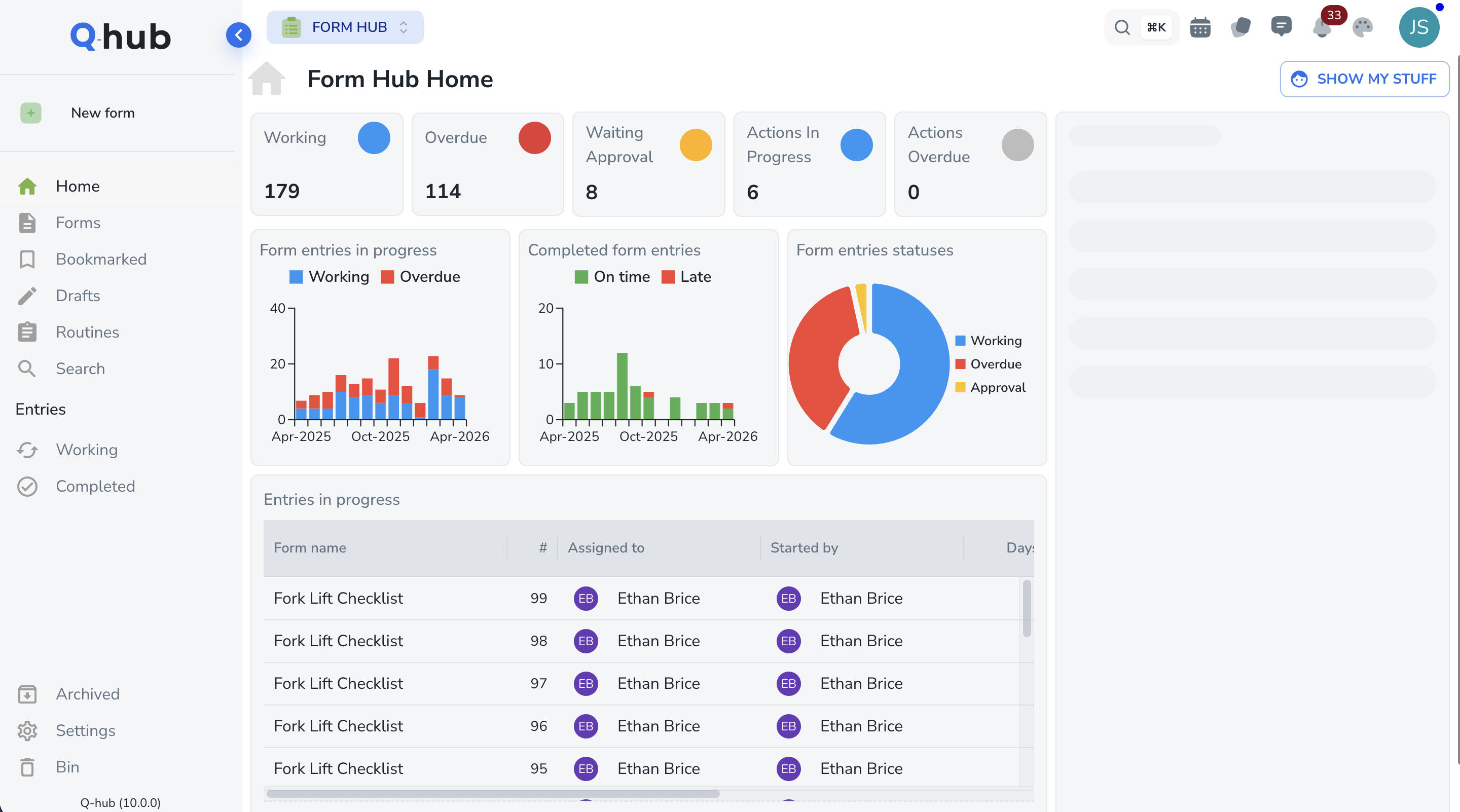
Incident Reporting — From Near Miss to Corrective Action in Minutes
Capture near misses, accidents, and safety observations from any device. Investigate root causes, track corrective actions, and analyse trends to prevent repeat incidents across every site.
Trusted by safety and compliance teams worldwide









Everything you need to capture, investigate, and prevent incidents
Six core capabilities that replace paper accident books, spreadsheet logs, and email-based follow-ups.
Near Miss Capture
Manage near miss capture efficiently with digital tools that replace manual processes. Configurable to match your specific requirements and compliance standards.
Learn moreInvestigation Workflows
Manage investigation workflows efficiently with digital tools that replace manual processes. Configurable to match your specific requirements and compliance standards.
Learn moreReportable Incidents
Record and track reportable incidents efficiently with digital tools that replace manual processes. Configurable to match your specific requirements and quality standards.
Learn moreTrend Analysis
Manage trend analysis efficiently with digital tools that replace manual processes. Configurable to match your specific requirements and compliance standards.
Learn moreWitness Statements
Manage witness statements efficiently with digital tools that replace manual processes. Configurable to match your specific requirements and compliance standards.
Learn morePhoto & GPS Evidence
Manage photo & gps evidence efficiently with digital tools that replace manual processes. Configurable to match your specific requirements and compliance standards.
Learn moreFrom incident report to prevention in five steps
A structured incident lifecycle that meets ISO 45001 requirements and HSE expectations.
Report
Report. Capture incident with photos and GPS Incident Reporting guides you through each stage with automated notifications, configurable workflows, and a complete audit trail so nothing falls through the cracks.
Investigate
Investigate. Root cause analysis with witness statements Incident Reporting guides you through each stage with automated notifications, configurable workflows, and a complete audit trail so nothing falls through the cracks.
Correct
Correct. Assign and implement corrective actions Incident Reporting guides you through each stage with automated notifications, configurable workflows, and a complete audit trail so nothing falls through the cracks.
Verify
Verify. Confirm actions resolved the root cause Incident Reporting guides you through each stage with automated notifications, configurable workflows, and a complete audit trail so nothing falls through the cracks.
Prevent
Prevent. Trend analysis drives systemic improvements Incident Reporting guides you through each stage with automated notifications, configurable workflows, and a complete audit trail so nothing falls through the cracks.
See Incident Reporting in action
Watch a 2-minute walkthrough of incident capture, investigation workflows, and trend analysis dashboards.
Still relying on paper forms and accident books to track incidents?
See how Q-Hub Incident Reporting transforms your safety reporting process.
Take the product tour
Explore Incident Reporting end-to-end, from mobile capture to trend prevention.
Schedule, conduct, and track audits with automated CAPA generation

Incident Reporting vs the alternatives
See why safety teams switch from paper forms and spreadsheets to Q-Hub.
| Feature | Paper Forms | Spreadsheets | Q-Hub |
|---|---|---|---|
| Digital workflows | Manual | ✗ | ✓ |
| Real-time dashboards | ✗ | ✗ | ✓ |
| Mobile access | Limited | ✗ | ✓ |
| Automated notifications | ✗ | ✗ | ✓ |
| Complete audit trail | ✗ | ✗ | ✓ |
| Role-based permissions | Basic | ✗ | ✓ |
| Custom reporting | Manual | ✗ | ✓ |
| Multi-site support | ✗ | ✗ | ✓ |
| Integration with other tools | ✗ | ✗ | ✓ |
| ISO compliance ready | ✗ | ✗ | ✓ |
Competitor pricing as published by each vendor. Figures marked ≈ are converted from the currency they were published in at today’s rate, for comparison only.
Calculate your incident reporting time savings
See how many hours Q-Hub could save your safety team every month.
Based on 60% time reduction. Actual savings depend on current processes.
Trusted by compliance teams worldwide
“Qhub provides a visible, intuitive way to manage data and workflows, revolutionising our approach to operations”

Fowlers of Bristol (Engineers) Ltd
Operations director
“Qhub helps us to... proactively use our QMS... and increase efficiency”

Anglia Cathodic Protection Services
Business manager
“Really made a difference with providing compliance during audits – both regulatory, customer, and internal.”

Auxitrol Weston
Quality manager
“QHub has supported us in achieving a higher compliance rate.”

BMC Analysis
Technical Manager/ Quality Manage
“We can't believe how fast we were able to get it up and running.”

Cawood Group
“Managing NCRs are now so much easier”

Enviromesh
Quality manager
“Where was this 2 years ago... we're blown away”

Jaltek
Compliance manager for Jaltek
“Qhub has improved our safety management system no end, making it very efficient”

Rocal Endurance Doors
Compliance manager
“We use it for as much as possible.”

Scottish Leather Group
Compliance manager
Used across regulated industries
How Q-Hub compares to other QHSE software
Feature-by-feature comparison with leading quality, safety, and compliance platforms.
| Feature | EcoOnline | SafetyCulture | Qualio | Intelex | Ideagen | Q-Hub |
|---|---|---|---|---|---|---|
| Integrated QHSE platform | Limited | ✗ | ✗ | Limited | Limited | ✓ |
| Document control with e-signatures | ✗ | ✗ | ✓ | Limited | ✓ | ✓ |
| Audit & inspection management | Limited | ✓ | Limited | ✓ | ✓ | ✓ |
| CAPA & NCR workflows | Limited | ✗ | ✓ | ✓ | ✓ | ✓ |
| Incident reporting | ✓ | ✓ | ✗ | ✓ | Limited | ✓ |
| Risk assessment builder | ✓ | Limited | ✗ | ✓ | Limited | ✓ |
| Training & competence tracking | Limited | ✗ | ✗ | Limited | ✗ | ✓ |
| Custom form builder | Limited | ✓ | Limited | ✓ | ✓ | ✓ |
| Supplier management | ✗ | ✗ | Limited | Limited | Limited | ✓ |
| Mobile offline inspections | ✓ | ✓ | ✗ | Limited | Limited | ✓ |
| Management review module | ✗ | ✗ | ✗ | Limited | Limited | ✓ |
| ROI calculator | ✗ | ✗ | ✗ | ✗ | ✗ | ✓ |
| UK data hosting | Limited | ✗ | ✗ | ✗ | Limited | ✓ |
| UK-based support team | Limited | ✗ | ✗ | ✗ | ✓ | ✓ |
| Transparent pricing (no hidden fees) | ✗ | ✗ | ✗ | ✗ | ✗ | ✓ |
| Free 30-day trial | ✗ | ✓ | ✓ | ✗ | ✗ | ✓ |
| Live in under 4 weeks | ✗ | ✗ | ✗ | ✗ | ✗ | ✓ |
Competitor pricing as published by each vendor. Figures marked ≈ are converted from the currency they were published in at today’s rate, for comparison only.
Your data is safe with us
Each certification and commitment, with the detail behind it.
Connects with the tools you already use
Q-Hub connects to your existing tools via REST API, webhooks and SSO, with bespoke connectors on request. More integrations coming soon.
Frequently Asked Questions
The mobile form takes under 60 seconds to complete. No app download needed -- it works in any browser. Guided fields ensure even the least tech-savvy workers can report accurately.
Fully configurable. Define your own incident categories, severity levels, investigation workflows, and notification rules. We set these up during onboarding at no extra cost.
Yes. Upload your existing incident log in any format and our team migrates historical data during onboarding. Your trend analysis starts with a complete picture from day one.
Works even better together
Incident Reporting is part of the Q-Hub integrated platform. Combine it with these modules for end-to-end safety management.
Book a personalised demo
See how Q-Hub fits your team. Our specialists will walk you through the platform, answer your questions, and show you exactly how it works for your industry.
View PricingNo credit card required · 30-day free trial · Live in 4 weeks
Build Incident Reporting workflows your way
Every team works differently. Q-Hub adapts to your processes with configurable forms, workflows, and dashboards. No coding required.
- Drag-and-drop form builder with conditional logic
- Custom dashboards and automated reports
- Role-based permissions and approval chains